Software engineering / Capability








Web application development.
Browser-based tools for customers and staff, built for the data, roles and permissions behind them.
Tell us what you’re building
When to bring us in
Sound familiar?
- Our team runs the business from shared spreadsheets that keep getting out of sync.
- The portal works, but it slows to a crawl once a customer has real data in it.
- Anyone with a login can see far more than they should.
The cost of leaving it
The spreadsheets drift further apart and someone spends each week reconciling them. Access stays wider than it should, and the gap only shows when something goes wrong.
Why us
What we bring to web application development.
We run what we ship
We build and operate SoulCare and SimRhythm ourselves, so releases, support and upgrades after launch are familiar work.
One codebase where it fits
SimRhythm runs on iOS, Android and the web from a single Expo app, which keeps three platforms on one release.
Code and accounts in your name
Repositories, cloud accounts and databases belong to you, and handover includes deployment steps and operating notes.
What the work includes

Software your team can rely on all day.
Most business web applications are lists, forms, schedules and reports used for hours at a time. We build them to stay fast with real volumes of data, to respect who can see and change what, and to make the common task the quick one. Critical paths get automated tests before they reach production.
Front end
Responsive interfaces for dashboards, forms, tables and schedules that hold up with real data.
Back end and data
Services and database design that keep records consistent as more people use them.
Roles and permissions
Access rules defined per role and enforced on the server, not only hidden in the interface.
Testing and release
Automated tests on the critical paths and a repeatable way to release changes.
Use cases
Projects we take on.
A booking and scheduling tool
Staff manage appointments, availability and reminders in one place instead of a calendar, an inbox and a spreadsheet.
A client document portal
Clients upload files, track requests and see status updates, with each firm’s data kept apart from the next.
An operations dashboard
Jobs, people and exceptions on one screen, with filters that stay quick when the list runs to thousands of rows.
What you get
Outputs you can review.
- Working web application in your environments
- Database schema and migration scripts
- Role and permission model
- Automated tests for critical paths
- Source code and technical documentation
Technologies we use for this
Where it matters
- Health & social care Carer apps have to record visits and medication on poor signal, then sync cleanly once the phone is back online.
- Property & field services Workers capture photos and checklists on site, so uploads must survive a weak connection and still attach to the right job.
- Fintech & professional services Portals and internal tools need permissions down to the record, plus a log of who viewed, changed or approved each one.
Where AI helps
Useful, on a short leash.
Search across your records
Let staff ask questions in plain language over notes and documents, with answers limited to what their role can see.
Knowledge assistants ↗Reading uploaded documents
Pull fields from forms and attachments into the record, with low-confidence values sent to a person to check.
Document data extraction ↗
Where it stops: Permissions, calculations and anything that changes a record should be ordinary, tested code, not a model’s output.
What’s changing
Shifts to plan for.
August 2026
Google Play targets Android 16
New apps and updates for phones and tablets must target API level 36. Extensions can be requested until 1 November 2026.
April 2026
Node.js 20 reaches end of life
The Node.js project stopped security fixes for version 20 on 30 April 2026, so services still on it need a move to 22 or 24.
April 2026
App Store requires the iOS 26 SDK
Since 28 April 2026, uploads must be built with Xcode 26. Apps can still support older iOS versions; only the build tools changed.
Process
How the work runs.
Model the data first
Tables, relationships and ownership rules are agreed before screens, because they are the hardest part to change later.
Ship thin slices
Each slice runs from database to screen, so you use a real feature early rather than reviewing parts in isolation.
Test what matters
Sign-in, permissions and any action that changes money or records get automated tests before release.
Release into your accounts
The application is deployed to environments you own, with a documented way to ship the next change.
Cost
What shapes the estimate.
Number of workflows
Each distinct workflow brings its own screens, rules and tests.
Data to bring across
Importing and cleaning records from older systems can be a project in its own right.
Permission detail
Simple admin and user roles are quick, while per-team or per-record access rules take longer to build and test.
Ways to work together
A first, fixed stage
Discovery, a prototype or a technical review with agreed outputs, so the next decision is made with something concrete in hand.
Delivery in phases
The build split into releases, each with a scope you review and approve before it starts.
Ongoing engineering
An agreed scope for support and improvements after launch, with response expectations written down.
Relevant product work
See it in SoulCare.
SoulCare’s React web dashboard brings rostering, eMAR and finance together for the coordinators who run home-care visits.
Explore SoulCare ↗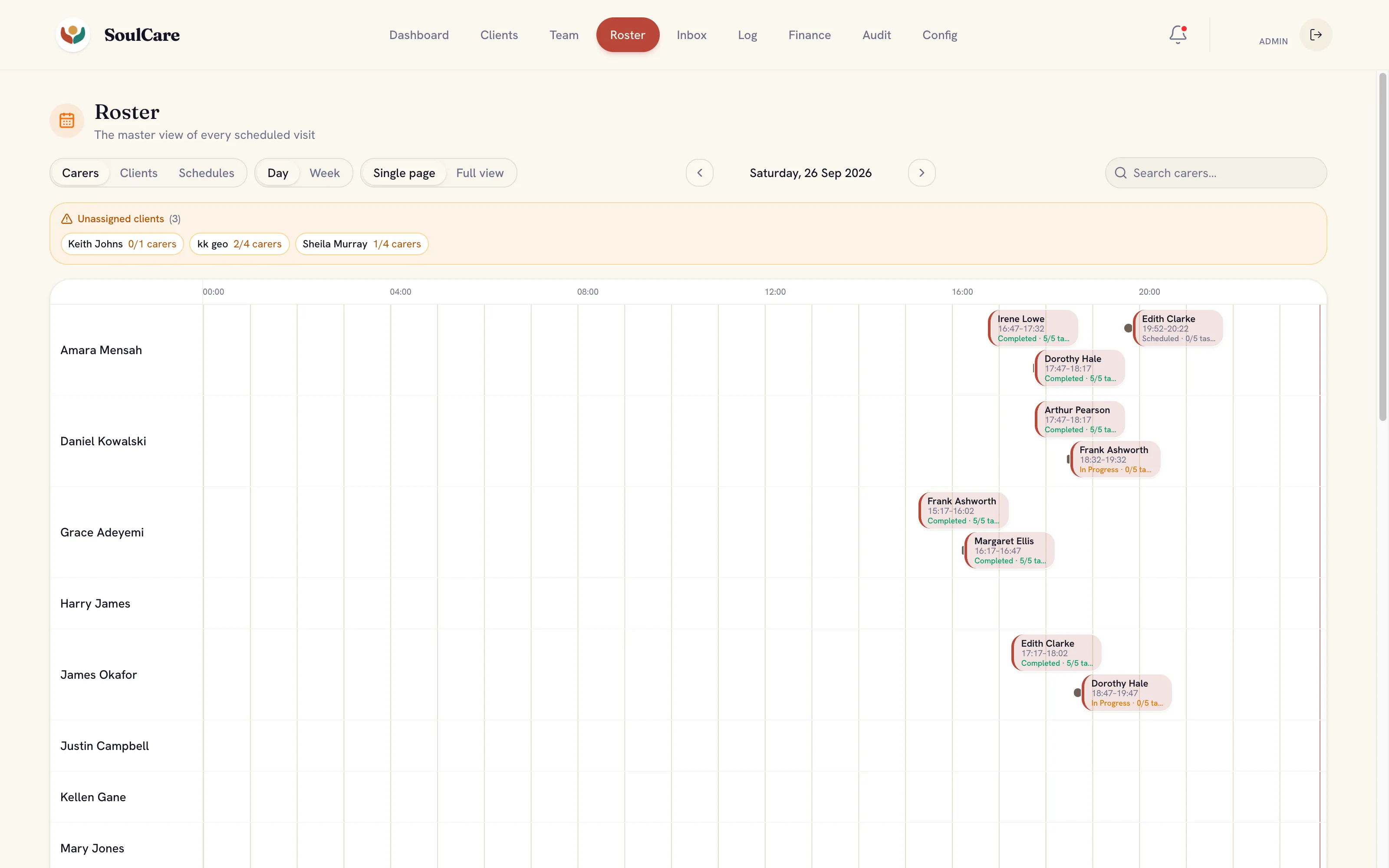
Common questions
Before you get in touch.
Can you take over a web application someone else built?
Yes, after a review of the code, data, hosting and the areas you want to change. That review tells us what is practical and where the risks are.
Can it run on our own cloud account?
Yes. We can deploy to your AWS, Azure or Google Cloud account so you keep ownership of the environment and the data.
What drives the cost of a web application?
The number of roles and workflows, integrations with other systems, data migration, reporting needs and how much of the product is defined before we start.
Further reading
- Awaab’s Law and the software landlords use for repairs What Awaab’s Law asks of the systems social landlords use to log, investigate and repair hazards, and the records they need to keep.
- Firebase, Supabase or a custom back end: how to choose How to choose between Firebase, Supabase and a custom back end by data shape, access rules, cost, exit paths and skills.



- One codebase, three platforms: iOS, Android and web with Expo Lessons on sharing code, drawing with Skia and handling phone, tablet and desktop layouts from one Expo codebase.